Choosing the best cemetery management software means finding a system that centralizes your records, streamlines core operations, and secures your data for the long term. The right software isn't about the longest feature list; it's about how well it solves the specific, day-to-day problems of running a cemetery, from mapping and sales to work orders and compliance. A truly effective platform replaces fragmented paper records and spreadsheets with a single source of truth for your entire team.
What Is Cemetery Management Software, Really?
Cemetery management software is a specialized system designed to handle the unique data and workflows of a cemetery. It goes beyond generic business tools by providing an integrated platform for managing spaces (graves, niches, crypts), people (both owners and the interred), and the complex financial and legal documents that connect them over decades, or even centuries.
While many cemeteries start with spreadsheets, paper lot cards, or general accounting software, these tools eventually create more problems than they solve. They aren't built to manage spatial relationships, track chains of ownership, or connect a single person's record as both a lot owner and, later, an interred individual. This leads to data silos, duplicate entry, and a high risk of error. For example, a spreadsheet can't prevent you from selling the same space twice, and a paper ledger can be lost to fire or flood, taking your cemetery's history with it. Cemetery software is built to prevent these specific, high-stakes issues.
Core Features to Compare in Any Cemetery Software
When evaluating software, focus on how it handles the fundamental pillars of your operation. These core features are the non-negotiable foundation upon which all other efficiencies are built. A weakness in any of these areas can create significant problems down the line, regardless of what other advanced features are offered.

Mapping and Space Management
This is the heart of any cemetery system. Your software must provide a clear, accurate, and easily searchable inventory of all saleable spaces. Look for a system that uses a logical hierarchy, such as Cemetery → Section → Subsection → Space. This structure should accommodate all your inventory types, including graves, niches, crypts, and lawn plots.
A critical function is the ability to see the status of any space at a glance: available, reserved, or occupied. This visual inventory is your primary defense against the catastrophic error of a double sale. The system should make it impossible to sell an occupied space. Furthermore, it should allow you to associate key data with each space, such as its price, capacity (e.g., a grave that can hold multiple interments), and perpetual care status.
Records Management for People and Ownership
Your software must be able to track two distinct but related types of information: ownership records and interment records. A robust system understands that a person can be an owner for years before becoming an interment, and it should manage this without creating duplicate, conflicting records. Look for a system with a unified profile for each person, connecting all their roles and activities within the cemetery.
For ownership, the software needs to track the entire chain of title, from the initial purchase to any subsequent transfers. An append-only transfer history is essential for legal and historical accuracy. For interments, the system must capture all necessary details, including dates, locations, and any associated documentation. The ability to link family members is also a key feature, helping you answer inquiries from relatives and identify available family plots.
Sales, Contracts, and Financial Tracking
Modern cemetery management software should streamline your entire sales process, from initial inquiry to final payment. It should allow you to generate contracts, deeds, and other essential documents directly from the system, pulling data from the space and owner records to minimize manual entry and errors. Look for the ability to use standard templates or upload your own custom forms.
On the financial side, the software must be able to create invoices, record payments, and manage payment plans for pre-need sales. It should track the status of a sale, marking spaces as reserved while on a payment plan and then officially purchased upon completion. For accounting, check for integrations with common platforms. For example, Sunset offers a direct sync with QuickBooks Online and can also export data in a format compatible with Sage 50, allowing your office to work seamlessly with your bookkeeper or accountant.
How Do You Evaluate Software for Your Grounds Crew?
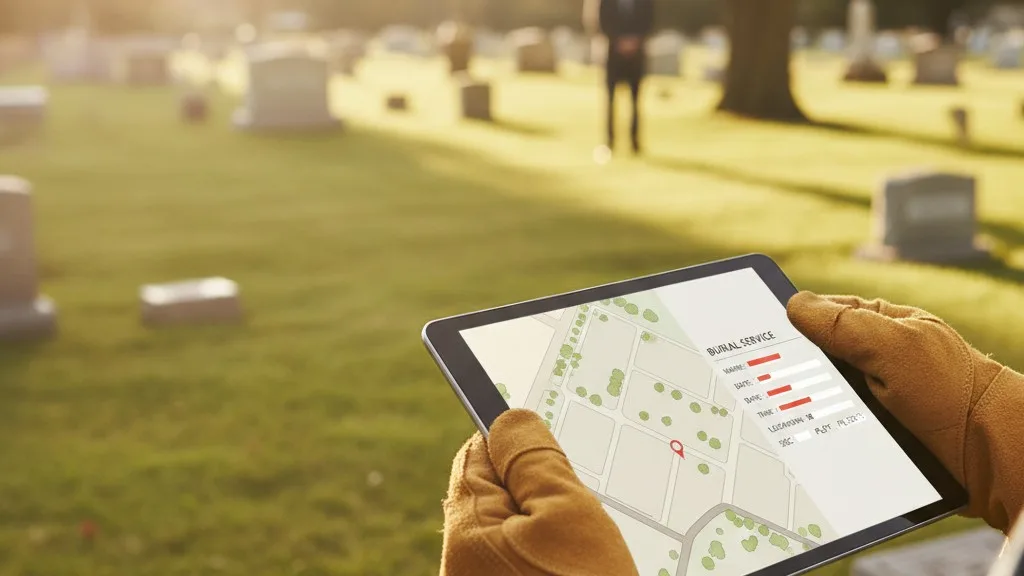
The best cemetery software connects the office to the field, ensuring your grounds crew has the precise information they need to perform their work accurately and efficiently. When evaluating software, ask how it supports the people responsible for interments, monument setting, and maintenance. Can your sexton or superintendent access work orders from a tablet in the field? The goal is to eliminate trips back to the office, ambiguous verbal instructions, and handwritten notes that can be easily lost or misinterpreted.
Look for a system that can generate clear, detailed work orders for burials and other tasks. A great work order includes the decedent's name, the exact space location (ideally with GPS coordinates), the date and time of the service, and any special instructions. This digital link between the sales contract and the physical groundwork is one of the most powerful ways to prevent errors. It ensures that what was sold in the office is exactly what is prepared in the field. For a deeper dive into this, see our practical guide to improving your cemetery operations workflow.
What About Data Security and Accessibility?
Your cemetery's records are irreplaceable historical and legal documents. Therefore, the security, backup, and accessibility of your software are paramount. Modern, cloud-based cemetery software offers significant advantages over on-premise servers or local computer installations, which can be vulnerable to hardware failure, theft, or natural disasters.
With a cloud-based system, your data is stored in secure, professionally managed data centers with redundant backups. This means you can access your cemetery's information from any computer with an internet connection, but only with the right permissions. Ask potential vendors about their security protocols, data backup frequency, and disaster recovery plans. Your data should be isolated from other cemeteries and protected by strong encryption. The vendor should also manage all software updates automatically, ensuring you are always on the latest, most secure version without needing an IT specialist.
Considering the Vendor's Background and Support
The software itself is only part of the equation. The company behind it is your long-term partner in preserving your cemetery's legacy. When choosing a vendor, consider their background. Are they a generic tech company that happens to have a cemetery module, or do they have deep, first-hand experience in the death care profession? A vendor who understands the nuances of cemetery operations is more likely to build a product that solves your real-world problems.
LarkTek, the family-owned company that builds Sunset, was founded by people with decades of experience running their own cemeteries. This background informs every aspect of the software's design. Equally important is the quality of training and support. The transition to a new system is a significant project. A good partner will provide comprehensive onboarding, data migration assistance, and responsive, knowledgeable support. Ask about their support hours and how you can contact them when you have a question. Check if they offer a direct line to people who can answer your questions, not just a generic ticket system.
Frequently Asked Questions
How much does cemetery management software cost?
The cost of cemetery management software varies widely based on the size of your cemetery, the features you need, and the vendor's pricing model. Most modern software is sold as a subscription (SaaS, or "Software as a Service"), which typically involves a monthly or annual fee. This model usually includes all updates, support, and data hosting. While some vendors may still offer a one-time license fee, this often comes with separate, additional costs for support, updates, and maintenance. Be sure to ask for a clear breakdown of all potential costs, including setup, data migration, and training.
How long does it take to implement new software?
Implementation time depends on the complexity of your existing records and the size of your cemetery. The process typically involves several phases: discovery and planning, data migration (converting your paper or digital records into the new system), system configuration, and staff training. This can take anywhere from a few weeks to several months. A vendor with a well-defined onboarding process and experience with data migration can help make this transition smoother and more predictable.
Can we migrate our old paper records or spreadsheets?
Yes, migrating existing records is a standard part of implementing new cemetery software. For digital records like spreadsheets, the process is relatively straightforward. For paper records, the information will need to be digitized, which usually means manually entering the data into the new system. While this can be a time-consuming project, it is a critical investment in your cemetery's future. Some software vendors may offer data entry services for an additional fee. This process is also an excellent opportunity to conduct a thorough cemetery records audit to clean up old errors.
Choosing the Right Partner for Your Cemetery
Selecting cemetery management software is a decision that will impact your operations for years to come. By focusing on the core features that truly matter—mapping, records, and financials—and by evaluating how a system supports both your office and grounds crews, you can make an informed choice. Look beyond the feature checklist to the company behind the software. A partner with genuine cemetery experience who offers robust security and reliable support is essential for safeguarding your community's history.
If you're tired of juggling spreadsheets and paper files, and you're ready for a single, reliable system to manage your cemetery's operations, we'd be happy to show you how Sunset works. Book a conversation with our team to see how software built by cemetery people can help you.