
Cemetery management software saves your staff significant time by centralizing records, automating routine tasks, and streamlining communication between the office and grounds crew. It replaces inefficient paper-based systems and disconnected spreadsheets with a single source of truth, allowing your team to find information faster, reduce errors, and focus on serving families.
1. By Centralizing All Your Records in One Place
Centralized record-keeping is the single most significant time-saver provided by modern cemetery management software. Instead of searching through filing cabinets, cross-referencing paper lot cards with binders of deeds, and trying to decipher old spreadsheets, your staff can access all information from a single system. This means ownership records, interment details, financial data, and plot locations are all interconnected and searchable.
Imagine a family calls with a question about a pre-need contract from years ago. With a paper system, this could trigger a lengthy search through multiple files. With cemetery management software, an office administrator can look up the family’s name and instantly see the original contract, payment history, and the specific spaces reserved. This eliminates the need to physically pull files, reducing a task that could take minutes or even hours down to seconds.
This centralization also dramatically reduces the time spent verifying information. When your sales team, office staff, and grounds crew are all working from the same live data, you eliminate the delays and errors caused by outdated copies. There's no more calling the office to confirm a plot's availability or second-guessing handwritten notes on a lot card. Everyone has access to the most current information, which is a foundational step toward a more efficient cemetery operations workflow.
Sunset provides a single, unified system for all your cemetery data. It links people, spaces, ownership records, documents, and financial information together, so you can find what you need without switching between different tools.
2. By Streamlining the Sales and Contracting Process
The process of selling a plot and finalizing a contract involves numerous steps that can be incredibly time-consuming with manual methods. Cemetery management software streamlines this entire workflow, from initial inquiry to a signed agreement. It allows your staff to quickly identify available inventory, generate accurate quotes, and create professional contracts without manual data entry.

When a family is considering a purchase, your staff can pull up a digital map to show available plots, complete with pricing and specifications. Once a selection is made, the software can automatically generate a purchase agreement, pulling in the buyer’s information and the details of the selected spaces. This avoids the need to re-type names, addresses, and plot descriptions, which is a common source of errors and delays. The risk of selling the same plot twice is virtually eliminated.
Payment plans are another area where software provides major time savings. Instead of manually tracking payments in a spreadsheet and updating balances, the software can automate the entire process. It can set up recurring invoices, record payments as they come in, and automatically update the status of the contract. When the final payment is made, the system can mark the spaces as fully purchased, securing the family's ownership and providing a clear audit trail.
Sunset allows you to generate contracts directly from templates. It can manage payment plans for pre-need sales, marking spaces as reserved until the plan is paid in full, at which point ownership is finalized in the system.
This automation not only saves administrative time but also presents a more professional and organized experience for the families you serve. It reduces the chance of miscommunications about pricing or payment schedules and ensures all documentation is handled consistently and accurately.
3. By Making Financial Reporting and Billing Faster
Managing cemetery finances involves more than just sales. You have perpetual care contributions, marker fees, and other services that require careful tracking and reporting. Cemetery management software automates many of these financial tasks, saving your bookkeeper or office manager a substantial amount of time each month.
Instead of manually creating invoices in a separate program, the software can generate them automatically based on sales contracts or service orders. When a payment is received, it can be applied directly to the corresponding invoice, keeping your accounts receivable accurate and up-to-date. This eliminates the double entry that often occurs when using separate systems for sales and accounting.
Generating financial reports is also simplified. With a few clicks, you can produce reports on sales revenue, outstanding balances, and perpetual care fund contributions. This makes it easier to monitor your cemetery's financial health and prepare for board meetings or audits. Manually compiling these reports from spreadsheets and paper ledgers can take days; software can generate them on demand.
For cemeteries that use external accounting software, the right cemetery management platform can save even more time. For instance, an integration or export feature means you don't have to manually re-enter every transaction into your accounting system. Sunset offers a direct sync with QuickBooks Online or a CSV export compatible with Sage 50, bridging the gap between your cemetery operations and your general ledger. This connection reduces clerical errors and frees up staff time for more valuable work.
4. By Improving Communication with the Grounds Crew
Clear and accurate communication between the office and the grounds crew is essential for smooth operations. Miscommunication can lead to serious errors, such as digging in the wrong location or installing a marker on the wrong plot. Cemetery management software acts as a central communication hub, ensuring the grounds team has the precise information they need to do their job correctly the first time.
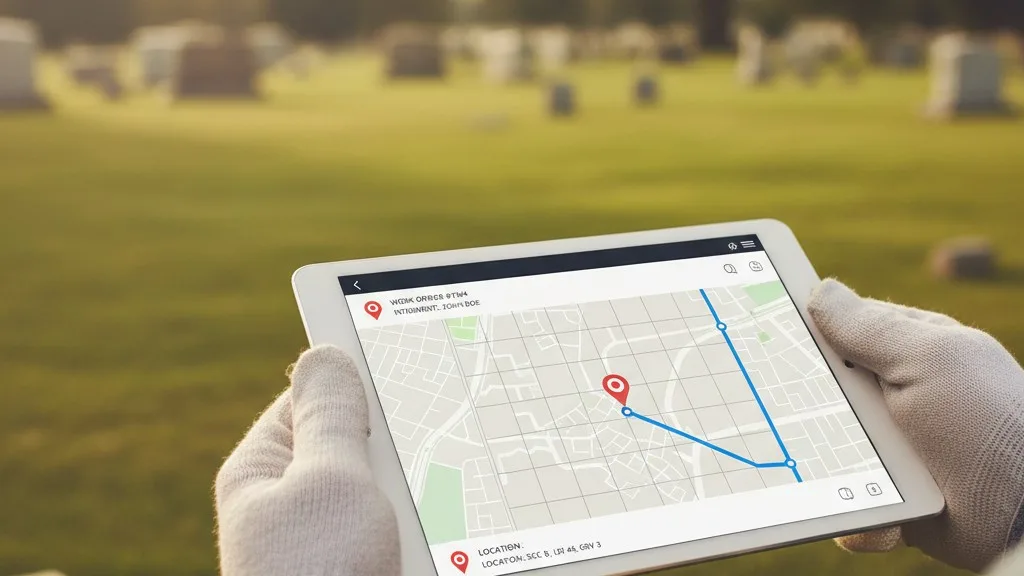
When a new interment is scheduled, all the necessary information can be entered into the system, creating a digital work order. This order can include the decedent's name, the exact plot location with GPS coordinates, the scheduled time for the service, and any specific instructions, such as the type of vault required. The grounds superintendent can access this information directly, eliminating reliance on paper notes, text messages, or verbal instructions that can be easily lost or misinterpreted.
This is especially critical for cemetery GPS mapping. By equipping your grounds crew with access to the central map, they can use a tablet or phone to navigate directly to the correct space. This level of precision minimizes the risk of costly and distressing mistakes. After the work is complete, the crew can update the status in the software, confirming that the interment has taken place or that a monument has been set. This real-time update keeps the office informed without requiring a phone call or a trip back to the main building.
This improved workflow not only saves time by reducing rework but also enhances the professionalism of your entire operation. It builds a reliable system of record for all grounds-related activities, from routine maintenance tasks to critical interment services.
5. By Simplifying Ownership and Genealogy Inquiries
Cemetery offices spend a great deal of time answering inquiries from families, genealogists, and researchers. These questions often involve tracing plot ownership, confirming interment locations, or finding relatives buried nearby. Without a centralized, searchable database, answering these questions can involve a time-consuming deep dive into fragile, decades-old paper records.
Cemetery management software transforms this process. With a powerful search function, staff can quickly look up information by name, date, or plot location. A query that might have taken 30 minutes of searching through card catalogs and ledgers can be answered in seconds. For example, if a descendant calls asking to find their great-grandfather's grave but only knows his last name and an approximate year of death, a quick search can pull up all matching records instantly.
Modern software also helps manage the complexity of ownership history. Plots are often transferred through generations, and tracking this chain of ownership is crucial. Sunset, for instance, maintains a complete, append-only transfer history for each space. This means you can see not only who the current owner is but also a clear record of every previous owner, which is invaluable for resolving ownership disputes or verifying rights of interment.
By making this information easily accessible, you empower your staff to provide faster, more accurate service. This not only saves internal staff time but also improves the experience for the public, reinforcing your cemetery's reputation as a well-managed and helpful community resource.
6. By Automating Document Generation and Management
Cemeteries run on documents: deeds, contracts, interment orders, and various authorization forms. Creating these documents manually is repetitive and prone to error. Staff may have to re-type the same information into multiple templates, increasing the risk of typos and inconsistencies. Storing and retrieving these paper documents also consumes time and physical space.
Cemetery management software automates document generation. Using templates, the system can automatically populate a deed or purchase agreement with the correct owner names, plot descriptions, and pricing from the data already in the system. This